Graph Engineering with Claude: 14-Step Roadmap from 0 to Graph Architect
A 14-step roadmap that turns a linear agent pipeline into a coordinated graph — fan out across a fleet, verify findings, and converge on results a lone agent could never hold.
The Problem with Linear Agents
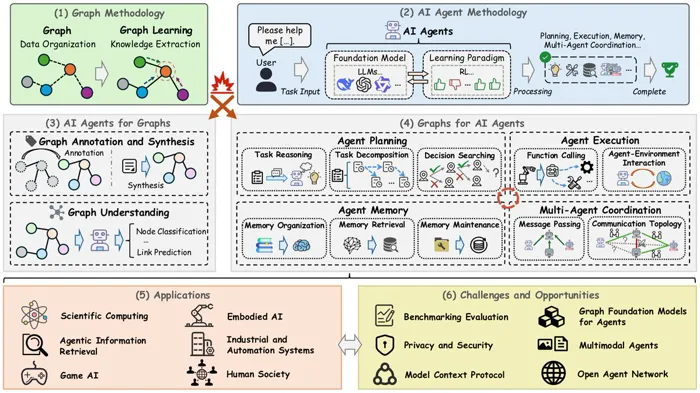
Most people who try to build a multi-step agent end up with a straight line. Step one, step two, step three — each waiting politely for the last to finish before it starts.
9/10 notice that half those steps never needed to wait at all.
They don’t route. They don’t branch. They don’t parallelize. They just queue — one head, one context, one thing at a time, until the window fills up and the agent forgets what it was doing.
Follow my Substack to get fresh AI alpha: movez.substack.com
This is the 14-step roadmap that turns that single-file line into a graph: one that fans out across a fleet, verifies its own findings, and converges on a result a lone agent could never hold.
Here’s the shift nobody spells out. A prompt is a sentence. A loop is a cycle. A harness is the floor the agent stands on. But the shape of the work itself — what runs before what, what can run at the same time, what has to wait for everything else — that shape is a graph. Nodes do the thinking. Edges carry the results.
Claude Code shipped the tooling to build these graphs directly: dynamic workflows. Claude writes a plain JavaScript orchestration script, then spawns a coordinated fleet of subagents to execute it — and the coordination itself costs zero model tokens, because it’s code, not a conversation.
01. Nodes are jobs. Edges are what flows.
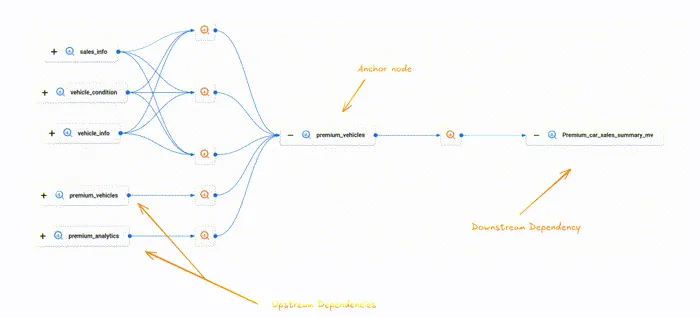
A graph has exactly two things, and getting them straight fixes most of the confusion. A node is a unit of work — one agent, one bounded job, one input in and one output out. An edge is a dependency: it says this node’s output feeds that node’s input. Nothing more.
The mistake is treating “and then” as an edge. “Summarize the file and then tell me the weather” has no edge between the two — the weather doesn’t consume the summary. That’s two disconnected nodes that a linear script needlessly chains. The edge only exists when data actually moves across it.
Learn to ask, for every “and then” in your agent: does the next step read the last step’s output? If not, there is no edge, and the wait is wasted.
Draw it as boxes and arrows. A box is an agent() call. An arrow is a variable passed from one call’s return into another’s prompt. If you can’t draw the arrow — if no variable crosses — the two boxes are independent, and independence is the thing you’ll exploit for the rest of this course.
02. Your linear script is a degenerate graph
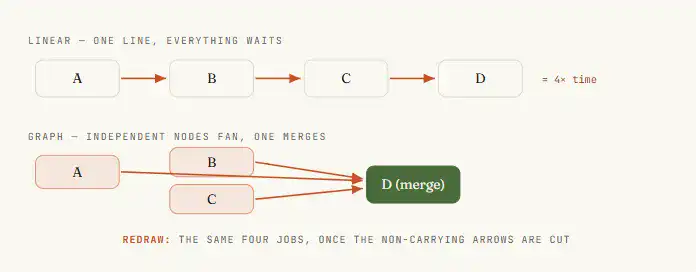
When you write an agent as “do A, then B, then C, then D,” you’ve drawn a graph — a single unbranching chain. Every node has exactly one edge in and one edge out. It runs correctly. It also runs slowly and is fragile, because a chain has no redundancy: if C stalls, D never happens, and A’s work is trapped upstream with nowhere to go.
The first real skill of graph engineering is redrawing the chain. Take your linear agent and, for each arrow, ask the Step 1 question. Most chains have two or three arrows that don’t carry data — they’re just the order you happened to type things in. Cut those arrows and the chain collapses into something wider: a few independent nodes that could all run at once, feeding a single node that needs them all.
03. Give every node a contract
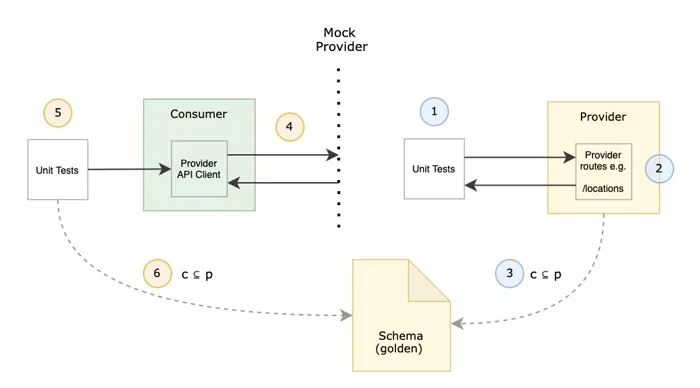
A node you can’t reason about is a node you can’t parallelize. The fix is a contract: bounded input, bounded output, exactly one job. The input is whatever the node reads — passed in explicitly, never assumed from a shared window. The output is a defined shape, ideally validated, so the next node can consume it without guessing.
In a workflow this contract is enforced with a schema. When you hand Claude an agent() call with a JSON schema, the subagent Claude spawns is forced to return validated structured data — validation happens at the tool-call layer, so Claude retries on mismatch instead of handing you free text you have to parse and pray over.
This is the difference between a node Claude can wire into a graph and a node that only works when a human reads its output.
const ITEM = {
  type: 'object', additionalProperties: false,
  properties: {
    title:   { type: 'string' },
    url:     { type: 'string' },
    impact:  { type: 'string', enum: ['high', 'medium', 'low'] },
  },
  required: ['title', 'url', 'impact'],
};

const result = await agent(source.prompt, {
  label:  `research:${source.key}`,
  schema: ITEM,
  agentType: 'general-purpose',
});
04. Treat the edge as a data contract
An edge isn’t just “B comes after A.” It’s a promise about what crosses: A produces this shape, and B is built to consume this shape. When you name the edge by its data — not its order — two things get easier. You can see instantly whether the edge is real (does data actually move?), and you can swap the node on either end without breaking the graph, as long as the shape holds.
In practice, the edge lives in plain JavaScript. The reduce step between fan-out and synthesis — flatten, dedupe, filter — is just code operating on the shapes your nodes returned. No agent needed. One of the quiet wins of graph thinking: a huge amount of what people burn model tokens on is really an edge, and edges are free.
The temptation is to spawn an agent to “combine the results.” Resist it. If combining means flatten-and-dedupe, that’s results.flatMap(...) and a Set — deterministic, instant, zero tokens. Save agents for judgment, not for plumbing.
05. Fan out with parallel()
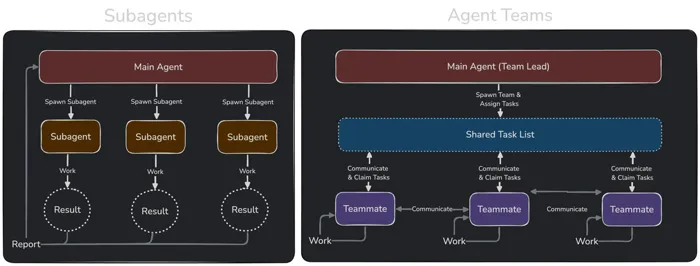
This is the move that pays for everything. When you have N independent nodes — N sources to check, N files to review, N routes to audit — you don’t chain them. You tell Claude to fan them out and run them at once. In a workflow that’s parallel(): Claude takes an array of thunks and spawns one subagent per thunk, all executing concurrently, then hands you back the array of results.
Two details make it robust. First, parallel() is a barrier — it waits for every thunk before it returns, so the next stage sees the complete set. Second, a thunk that throws resolves to null instead of rejecting the whole batch, so one flaky agent can’t sink the run.
phase('Research');

const raw = await parallel(
  SOURCES.map((s) => () =>
    agent(s.prompt, {
      label: `research:${s.key}`,
      phase: 'Research',
      schema: ITEM_SCHEMA,
      agentType: 'general-purpose',
    }),
  ),
);

const collected = raw.filter(Boolean);
06. Fan in at a barrier
A fan-out is only useful if something gathers it. The fan-in is the node where edges converge — where one agent (or one piece of code) sees all the upstream results at once and does something that requires the whole set: dedupe across sources, rank by impact, early-exit if the total came back empty. This is the one place a barrier earns its wall-clock cost.
The rule that keeps graphs fast: use a barrier only when a stage genuinely needs every prior result together.
const flat = collected.flatMap((c) => c.items);
log(`Collected ${flat.length} items`);

phase('Curate');
const curated = await agent(
  `Dedupe and rank these by impact:\n${JSON.stringify(flat)}`,
  { phase: 'Curate', schema: CURATED_SCHEMA },
);
Just flattening a list? That’s an edge, do it inline. If you wrote parallel → transform → parallel and that middle transform has no cross-item dependency, you should have used a pipeline and skipped the barrier entirely.
07. The diamond: split → work → merge
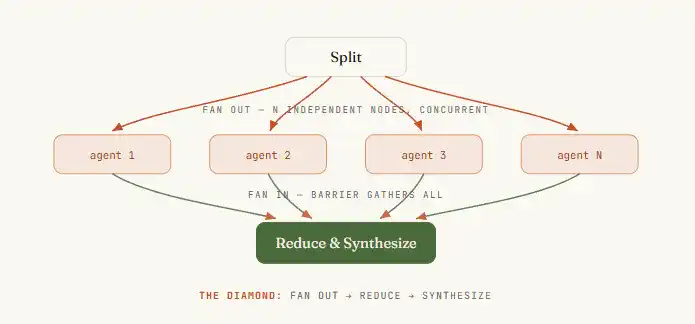
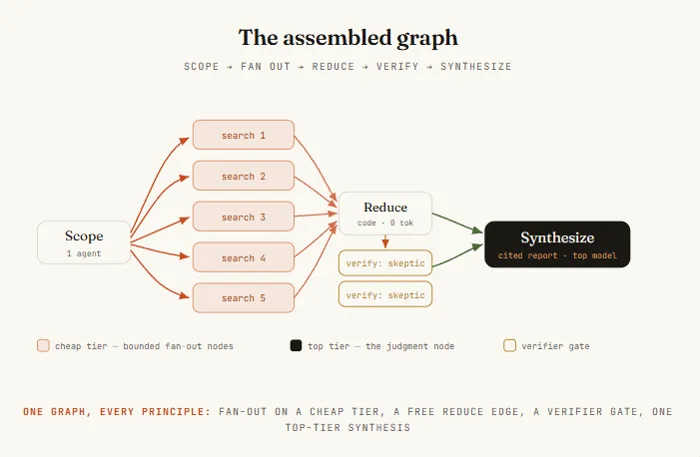
Put fan-out and fan-in together and you get the workhorse topology of every serious agent graph: the diamond.
One node splits the job, many nodes do the work in parallel, one node merges. It’s the shape behind a market scan, a dependency audit, a code review, a research report — swap the sources and prompts and the same skeleton adapts.
The canonical form has a name worth memorizing: fan out → reduce → synthesize. Fan out to gather breadth, reduce with plain code to compress it, synthesize with a final agent to write the answer.
Once you see the diamond, you stop asking “how do I make my agent do more steps” and start asking “where’s the split, where’s the merge” — which is the question that actually scales.
08. Route the edge at runtime with a conditional
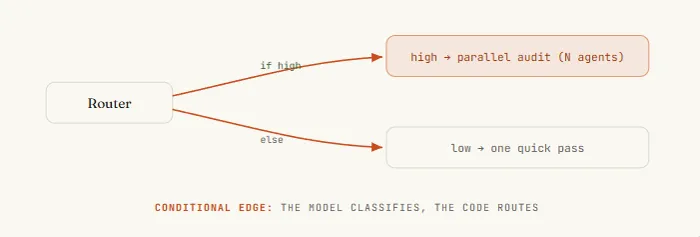
Not every graph is fixed. Sometimes the edge to take depends on what a node found. A router node inspects a result and decides which downstream path fires — classify the ticket, then branch to the right handler; check the diff size, then either do a quick review or spin up a full audit. In a workflow this is just a JavaScript if or switch on a node’s validated output.
const { severity } = await agent(
  `Classify this diff's risk:\n${diff}`,
  { schema: { type: 'object',
      properties: { severity: { enum: ['low', 'high'] } },
      required: ['severity'] } },
);

let review;
if (severity === 'high') {
  review = await parallel(FILES.map((f) => () => agent(`Audit ${f}`)));
} else {
  review = await agent(`Quick review of ${diff}`);
}
09. Put a verifier on the edge
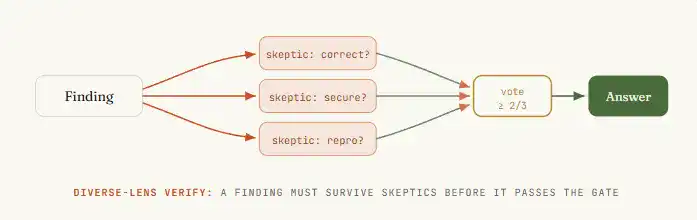
The real leverage of a graph isn’t more agents — it’s the structure you can wrap around them to produce confidence. A verifier node sits on the edge before a result is allowed downstream, and its only job is to try to kill the finding. If it survives, it passes. If not, it never reaches the answer.
Three patterns to know: Adversarial verify (spawn N skeptics to refute each finding), Perspective-diverse verify (correctness, security, does-it-reproduce), and Judge panel (generate N attempts, score with parallel judges, synthesize).
10. Isolate nodes so one failure can’t poison the graph
In a chain, a failure cascades. In a graph, failure should be contained to its node. A thunk that throws inside parallel() resolves to null, so eight good agents still return while one bad one drops out. Design every fan-in to tolerate missing inputs rather than assume a full set.
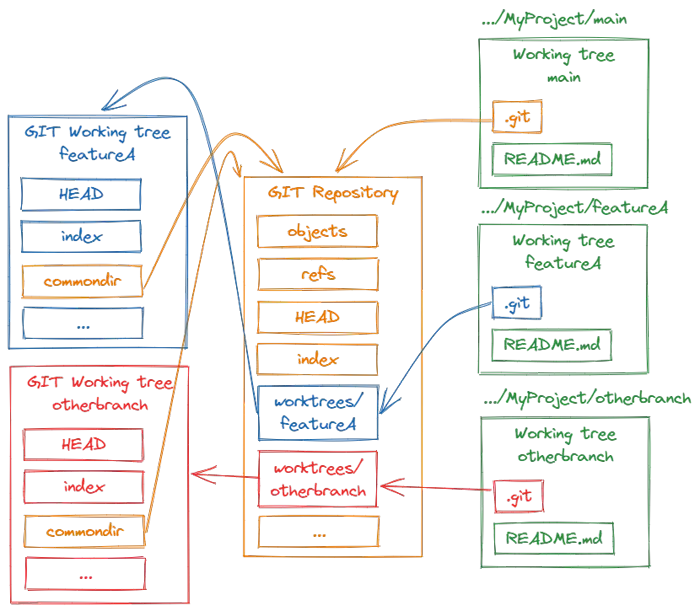
The subtler failure is nodes stepping on each other. When agents write files in parallel, they can collide. The fix is isolation via worktrees — each agent runs in its own git worktree, merges cleanly.
11. Add a cycle — but make it converge
Sometimes you don’t know how big the job is until you’re in it. That needs a cycle — a controlled edge back to an earlier node. The pattern that converges is loop-until-dry: keep spawning finders until K consecutive rounds surface nothing new.
const seen = new Set(); const confirmed = []; let dry = 0;
while (dry < 2) {
  // ... spawn finders, filter fresh, verify, push confirmed
}
Dedupe against everything seen, not just confirmed results — otherwise rejected findings reappear every round forever.
12. Tier the models across the nodes
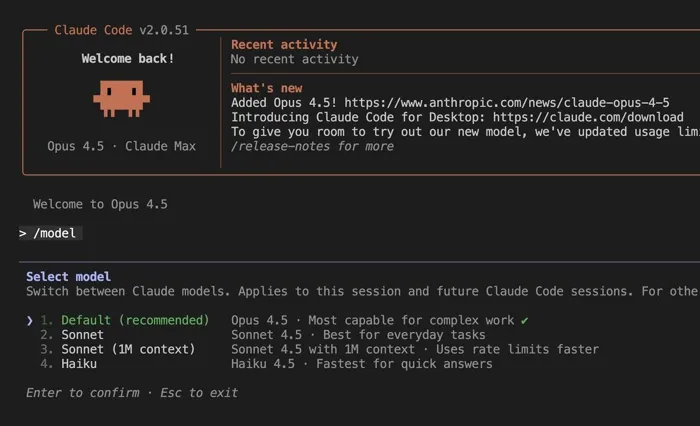
Not every node needs your best model. Run the boring nodes (extract, classify) on a cheaper model and spend expensive tokens where judgment lives. The model option on agent() tells Claude to route just that node elsewhere.
13. Topology is your cost and latency
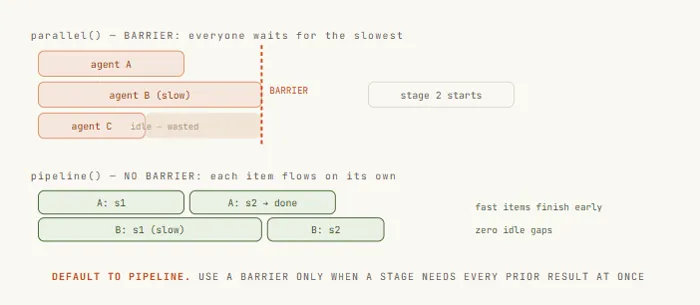
Default to pipeline(), not parallel(). A pipeline streams each item through all stages independently with no barrier — fast items finish early instead of idling. Reach for a barrier only when a stage truly needs every prior result at once.
14. Let Claude draw the graph — self-routing
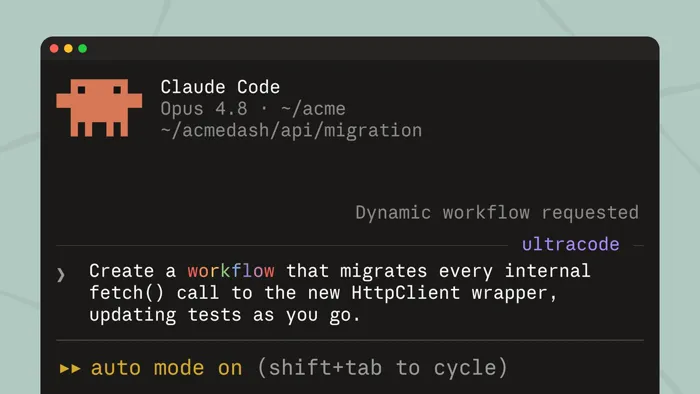
With dynamic workflows, you describe the objective and Claude writes the orchestration script itself. Three ways in: say “workflow” in your prompt, run a saved one like /deep-research, or turn on ultracode. Press s on a good run to save it into .claude/workflows/.
Six graphs to build with Claude this week
- Security sweep — one subagent per route file hunting for missing auth
- Cited report with
/deep-research— parallel searches, adversarial verify - Port a module — fan out across files, test gate on each, loop failures
- Adversarial diff review — route by size, parallel audit, judge panel
- Ecosystem scan — many sources in parallel, rank at barrier, write digest
- Discovery of unknown size — loop-until-dry bug finding
Conclusion
The linear agent was never the ceiling — it was just the first shape. Once you can see the nodes and the edges, you stop asking the agent to do more and start asking the graph to do it wider: fan out where the work is independent, gate the edges where confidence matters, tier the models where judgment doesn’t.
Most people will keep queueing steps in a line. The ones who learn to draw the graph will run a fleet.